Pay for your package Pay your invoice
Pay by QRIS or bank transfer, then send us the proof on WhatsApp.
- Please fill this in.
- Please fill this in.
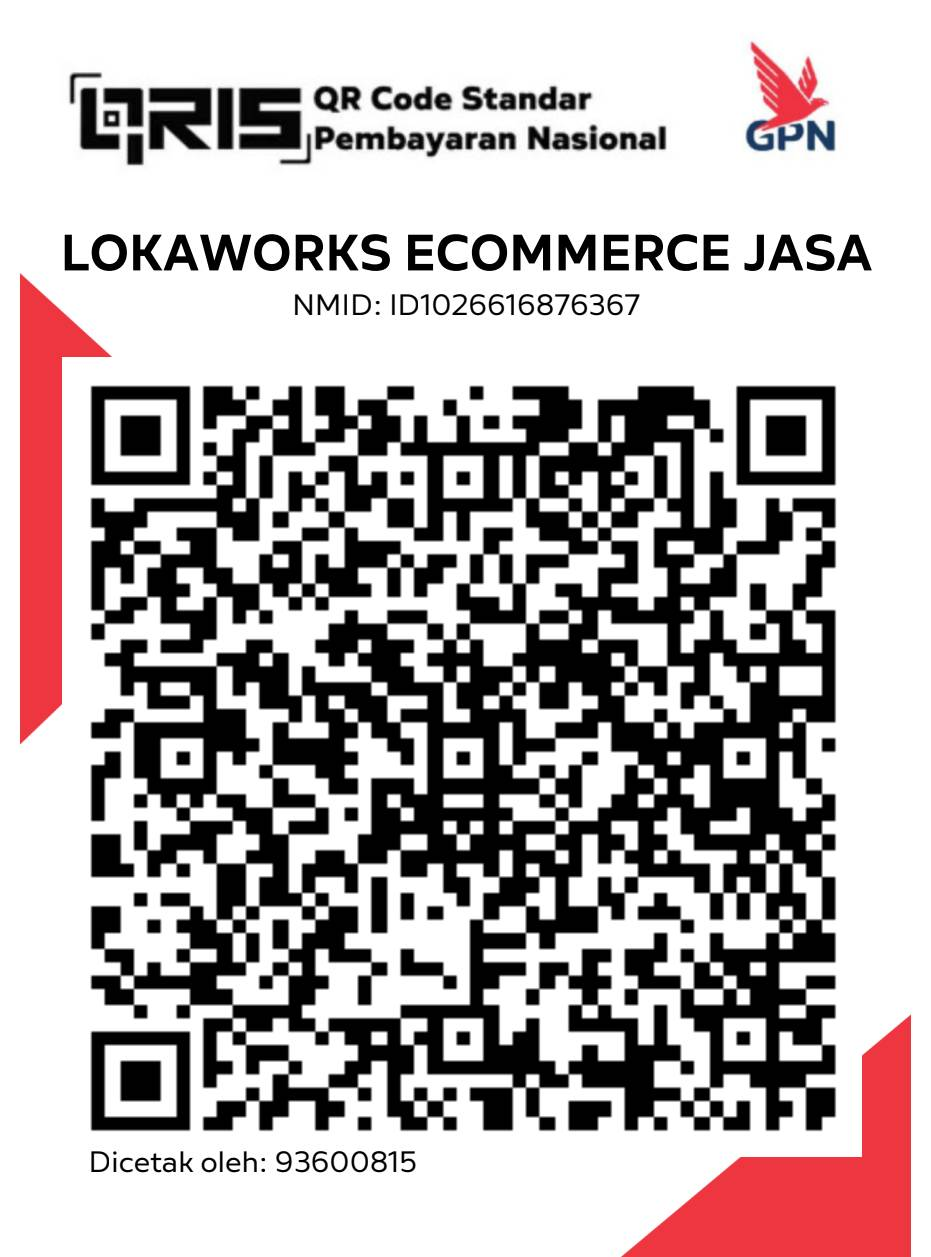
QRIS
Scan with any Indonesian bank or wallet app.
- Open your banking or wallet app and choose scan.
- Scan this code, or save it and open it from your gallery.
- Type the amount of your invoice.
- Check that the merchant name reads LOKAWORKS ECOMMERCE JASA, then confirm.
Bank transfer
QRIS takes up to IDR 10.000.000 per payment. For more, use a bank transfer.
- Bank
- Bank Central Asia (BCA)
- Account name
- PT Loka Kerja Asia
- Account number
- 87 2525 0254
- Amount
- IDR 0
- Transfer note
Write the order code in the transfer note so we can match your payment quickly.
From abroad, send rupiah to this account with Wise, or by bank wire with SWIFT code CENAIDJA.
We confirm your payment on WhatsApp within one business day and send your receipt.
Pay only to the QRIS named LOKAWORKS ECOMMERCE JASA or to the PT Loka Kerja Asia account above. We contact you only from WhatsApp +62 897 9797 132 and from @lokaworks.com email.