Skip to content

Our workHow we work

You always know what we are working on, and what comes next.

Six steps from the first call to the monthly report. Our team takes control of the store, and every step ends with something you can see.

From first call to monthly report.

  1. Free consultationDay 1, about 30 minutes
  2. OnboardingWeek 1
  3. Full Store DiagnosisWeek 1
  4. Strategy and KPIsThree days after onboarding
  5. ImplementationFrom week 2
  6. Reporting and reviewsEvery week, every two weeks, every month
  1. Step 1Day 1, about 30 minutes

    Free consultation

    We look at your store together and talk through what is working, what is not, and where you want to take it. If you did the store check, we start from your result.

    You get
    Two or three honest observations about your store, and a written proposal with the tier that fits. Free, with no obligation.
  2. Step 2Week 1

    Onboarding

    You add our team to your store as a sub account user, so your main account stays yours. A kickoff call covers your goals, your hero products, stock and product costs, and we open a shared group for everyday questions.

    You get
    Your daily contact on our team, a shared group, and a clear plan for the first month.
    We need from you
    Sub account access, your product costs, and one person on your side who approves promos and budgets.
  3. Step 3Week 1

    Full Store Diagnosis

    We go through the whole store: every listing, the search terms buyers use, your prices against competitors, fees and margins, ads, ratings and chat performance.

    The diagnosis is free with every plan. Not ready for a monthly plan? The same diagnosis is available on its own for USD 20IDR 300.000 per store.

    You get
    A diagnosis report that ranks what to fix, starting with the three changes that matter most.
  4. Step 4Three days after onboarding

    Strategy and KPIs

    In a strategy session we walk you through the diagnosis and agree the plan: which products to push, which marketplaces, the campaign calendar, and the numbers we report on, such as visitors, conversion, orders and ad cost.

    You get
    A one page plan and a campaign calendar. The numbers are how we measure our own work, not a sales promise.
  5. Step 5From week 2

    Implementation

    Our team takes control of the store. Listings, search, promos, ads and affiliates are worked on every week, and orders, late shipments and account health are checked every weekday morning. Chat replies come with Tier III.

    You get
    Changes you can see in your own Seller Centre, with campaigns and promotions planned with you ahead of time.
  6. Step 6Every week, every two weeks, every month

    Reporting and reviews

    Every plan gets a monthly report, with every figure compared with the month before. From Tier II you also get a written recap every week, a planning call every two weeks, and a dashboard with your numbers in one place.

    You get
    What we did, what it cost, how the numbers moved, and what comes next.

The rhythm in each tier.

Tier I Tier II Tier III
Store checked every weekday morning Included Included Included
Monthly report, compared with the month before Included Included Included
Written recap every week Not included Included Included
Planning call every two weeks Not included Included Included
Dashboard Not included Included Included
Chat replies Not included Not included Included

See the full tiers

At every step, you know four things.

  • Who is working on your store
  • What changed, and when
  • What it cost
  • What comes next

What we need from you.

  • Sub account access
  • Your product costs
  • A heads up when stock changes
  • One person who decides on promos and budgets

Start with a free consultation.

About 30 minutes, your store on screen, and an honest read on what to fix first.

From real dashboards, names removed.

Seller Centre screens from client stores, with store names removed and figures unchanged.Swipe a screen sideways to see all of it, or tap it to open it full size.Tap a screen to open it full size.

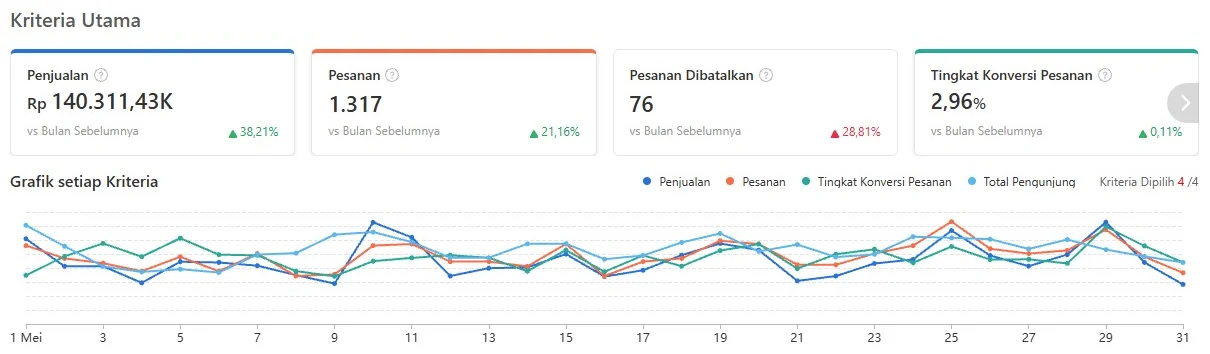
Shopee Seller Centre, Indonesia, May 2026

Sales of IDR 140.31 million in the month, 38.21% above the month before, from 1,317 orders, up 21.16%. Cancelled orders came to 76, 28.81% more than the month before.

Shopee Seller Centre, Indonesia, July 2026

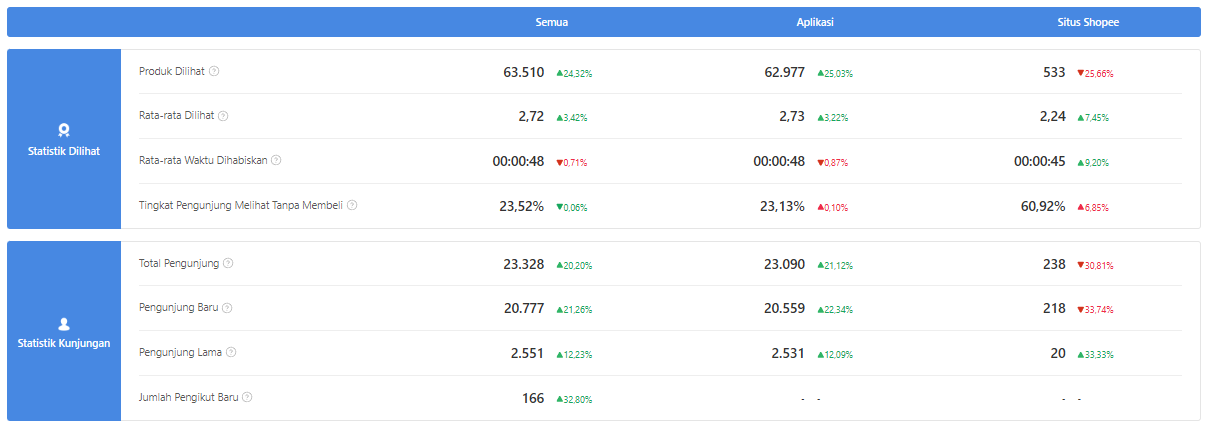
Views and visitors for the month. Products were viewed 63,510 times, up 24.32%, by 23,328 visitors, up 20.20%; 20,777 of them were new.

From the case studies

Tap a screen to open it full size.

Fix the page first, then pay for the traffic.

Case 04, Frozen food brandShopee Singapore, April to August 2026

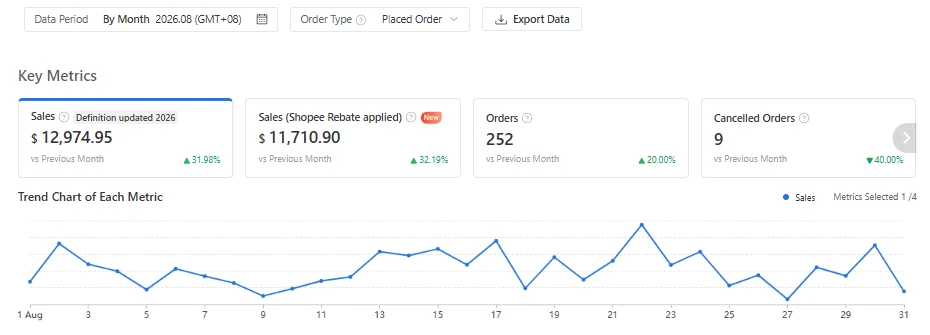
The audit said shoppers found the products and then left. So the plan put the page first: week one on the listings with no ad spend. The ads came back on about 9 May, and the budget rose only as the return held.

AfterAugust 2026
Screenshot: After. August 2026. Shopee Seller Centre, Business Insights, Overview (opens the full image in a new tab)

Shopee Seller Centre, Business Insights, Overview

What was done, and when

  1. About 2 May 2026Audit of 2 April to 1 May delivered, with a plan for month one.
  2. May17 listings rewritten. Shop banner and main images replaced. A listing violation resolved.
  3. About 9 MayAds restarted. During May the budget moved to the two campaigns that returned most.
  4. 23 and 31 MayTwo Shopee campaigns joined, the first running 23 May to 24 June, the second 31 May to 30 June. Platform voucher and delivery options set up in May.
  5. About 5 JuneMay report to the owner: sales, fees, refunds and account health.
  6. About 1 JulyJune report, with a product ranking and a competitor price check.
  7. About 13 AugustThree month review.

Dates marked about are the dates of our files. 9 May is read from the ads chart.

Read the case: Frozen food brand

Margin first, then the spend.

Case 03, Snack and grocery distributorRedMart (Lazada) and Shopee Singapore, May to September 2026

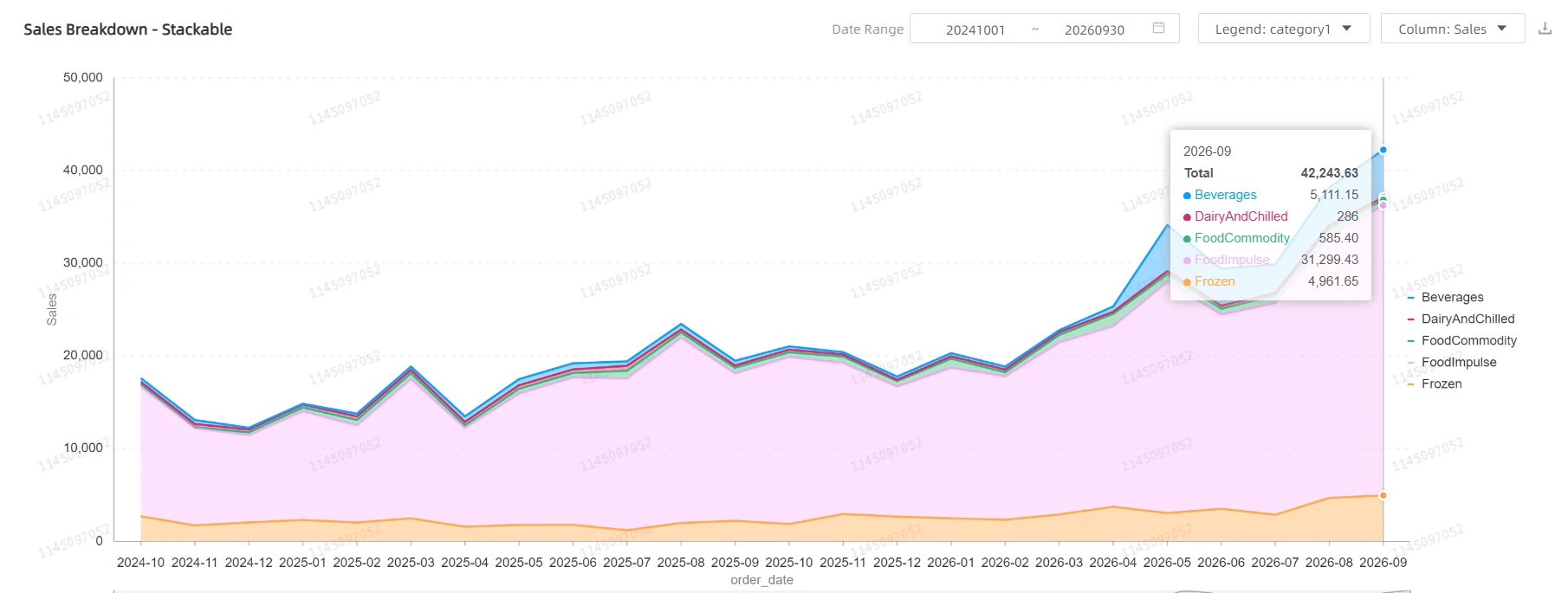
We did not start by adding spend. We started with what each product earns after fees, and the Shopee ads went live only after that.

AfterSeptember 2026
Screenshot: After. September 2026. RedMart seller analytics, sales by category by month (opens the full image in a new tab)

RedMart seller analytics, sales by category by month

What was done, and when

  1. 18 May 2026Data request sent to the client.
  2. 22 MayRead only audit of RedMart, the Lazada storefront and Shopee, through a sub account.
  3. 27 MayProfit model on the cost file of the client, for the 36 pack sizes (21 products) that had sold on Shopee.
  4. 17 JuneShopee profit review on real fees and costs. Still read only.
  5. 22 JuneShopee Ads live. By the end of June two campaigns ran, one on the best selling range and one across the shop.
  6. 6 JulyNew sponsored campaign live on RedMart, after our plan of 22 June to rebuild the campaigns.
  7. 22 SeptemberA written routine for RedMart deals takes effect, to be run each working day after the morning report.

27 May and 17 June are the dates of our files.

Read the case: Snack and grocery distributor

Is this your store?

  • Your store needs more hands than you have

    What is going on

    Slow replies, late listings and missed campaigns usually come from one busy person doing everything. Marketplaces notice, and slow chat and late orders pull your store score down.

    Check this first

    Look at your chat response rate and late shipment rate in Seller Centre. Those two numbers show where the time is slipping.

    How we can help

    Our team takes control of daily store management and listings, so you get your time back. Chat service comes with Tier III.

  • Your store needs a proper launch

    What is going on

    A new store starts with no reviews, no sales history and no search ranking, so the first weeks decide a lot. Rushed listings and no plan waste that window.

    Check this first

    Write product titles the way buyers search, and price your first products against the top three sellers in your category.

    How we can help

    We set up the store, list your products with search keywords and plan the first campaigns. Store setup comes with Tier II and Tier III.

Frequently asked questions

More questions? Write to us at hello@lokaworks.com

What access do you need to my store?
A sub account on your own shop, with the permissions the work needs. You keep ownership, see everything we do, and can remove the access at any time.
Who works on my store day to day?
The team that plans your store runs it, with one ops lead as your daily contact
Is there a minimum commitment?
No long contract. Plans are billed quarterly by default, at 10% off, from the day you start, or monthly if you prefer. You can stop at any time: a quarterly plan then runs to the end of the quarter you paid for, a monthly plan to the end of its month.
Can we change tier later?
Any time. The difference is prorated for the rest of the month, and the new tier starts the following week.